


Lime - #RideGreen
4.928.81K Reviews
App Specs
- Version
- 3.284.0
- Updated On
- License
- Free
- Downloads
- 10,000,000+
- Developer
- Neutron Holdings, Inc.
- Categories
- Travel & Local
- Platform
- Android
Screenshots
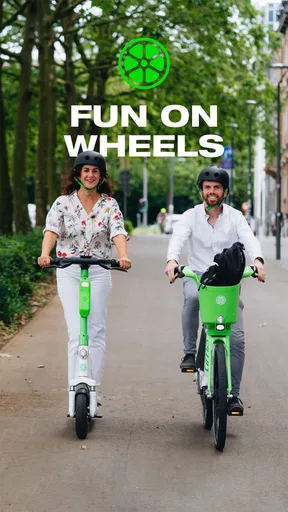
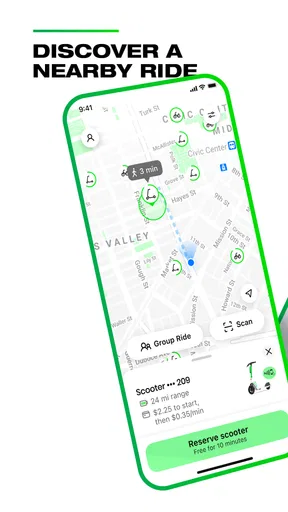
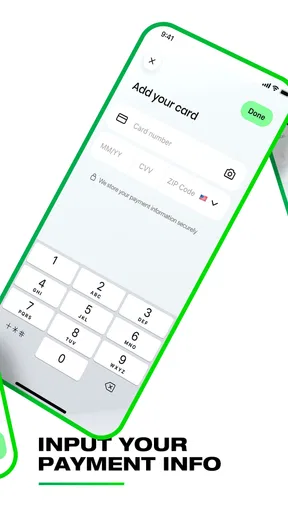
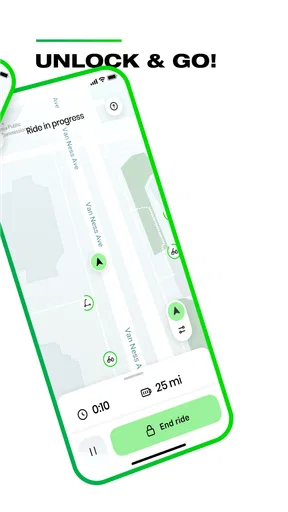
 Analysis by AppCompare
I usually think of Lime as a bridge between walking and arranging a full trip by car or public transport. The useful question is not whether a scooter is fun, but whether one is available at the right moment and makes the whole journey easier. That is where the app’s map-first approach helps: I can check the nearby options before committing, then decide whether a short ride is worth the handoff from my phone to the vehicle.
Start with the trip, not the scooter
Before opening Lime, I would pin down the actual destination and the part of the route that feels inconvenient. A short ride from a transit stop to an appointment is a different job from replacing a long commute, and shared scooters make most sense when they solve a specific gap. If the entire route is pleasant on foot, walking is simpler; if it is too far or the weather is poor, a bus, taxi, or car may be more dependable.
Once the map is open, I would look beyond which vehicle appears closest. A nearby scooter is only useful if its location works with the route and it has enough battery for the trip. Checking the vehicle details before walking over can prevent a frustrating start, especially when I am on a schedule. I also like to consider where I will finish: a ride is less convenient if the destination is awkward for parking or leaves me far from the entrance I need.
A practical trip from discovery to destination
Picture a weekday afternoon: I have stepped off a train and need to reach a meeting across town, with too little time to walk comfortably but no reason to book a car. I open Lime, scan the map, and compare the nearby choices. If a vehicle looks suitable, I check its battery and the estimated fare, then head to it rather than assuming the first icon is automatically the best one.
At the scooter, the QR scan is the key handoff: the app gets me from browsing to riding. I would take a moment to check that the vehicle is in usable condition and to get comfortable before joining traffic. The in-app safety tutorial is worth more than a quick glance if I am new to riding; familiarity with the controls and local riding rules matters more than saving a few seconds at the start.
During the ride, I would keep the phone put away and make decisions based on the road, not the map. The app can help with the transaction and vehicle choice, but it cannot make an unfamiliar street safe or guarantee a clear route. I would also leave enough time for the end of the trip: locating an appropriate place to park and finishing the ride carefully are part of the journey, not chores to rush through at the last curb.
What the handoffs mean in everyday use
Lime’s real convenience comes from moving between several small steps without needing to plan a whole transport service: find a vehicle, unlock it, ride, and park responsibly. That suits a quick errand, a connection between transit and a destination, or a spontaneous change of plans. For a regular route, I would test the same journey at the time I expect to travel rather than assume the map will look identical every day.
Worth Reading Before You Choose

Flipboard Shows What News Apps Must Do Beyond the Feed

Switching to Android Auto Means Rethinking Your Driving Routine

Google Calendar Makes a Crowded Week Easier to Manage

Ludo King Makes the Most of the Minutes Between Plans

Baby Panda World Brings Quick Play to Modern Phones, but Its Game Library Feels Busy

ESPN’s Live Game View Makes Following Close Games Easier
The choice also has a practical trade-off. A shared scooter gives me more control over the last stretch than a fixed bus route, but it still depends on a vehicle being nearby and ready. Public transport is often the better choice for a longer trip or when I want a predictable route without riding. Walking wins for a very short distance, while a taxi or car can be more suitable when I have luggage, a passenger who cannot ride, or conditions that make a scooter uncomfortable.
Where a good plan can still go wrong
The main friction is availability: a map can show options, but the closest vehicle may be depleted, inconveniently placed, or gone by the time I reach it. A weak battery check or a last-minute search can turn a time-saving idea into a delay. I would keep a backup in mind whenever arriving punctually matters, and I would not build an important connection around the assumption that a scooter will always be waiting.
Riding is not the right fit for everyone or every street. If I do not feel confident balancing, the route is busy or unsuitable, or I need to carry bulky items, I would choose another way to travel. Rain, darkness, and unfamiliar surroundings can also change the comfort calculation. Lights help with visibility, but they do not replace attention, protective judgment, or a helmet.
There is also a small planning question at the destination: can I leave the vehicle without obstructing a footpath or access point? If not, the last few minutes may erase the convenience of the ride. I would check the surroundings before starting and be willing to walk the final stretch to a suitable parking spot rather than stopping at the exact doorway.
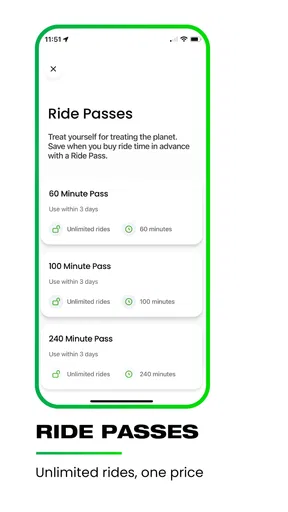
For an occasional rider, pay-as-you-go is easier to understand than committing to a routine, while frequent use only makes sense if the pass terms and the journeys I actually take work out for me. I would compare the likely total with a transit fare or a walk before treating a pass as a saving. The estimate in the app is useful for deciding, but I would still consider whether the trip’s convenience justifies its cost.
First Impressions and Getting Started
So, I fired up Lime for the first time, and right off the bat, I was impressed by its sleek, user-friendly interface. Registering was a breeze; it took just a couple of minutes to set up my account. You’ll need to enter some basic personal info and payment details, but Lime makes sure this process is as painless as possible.
Once you’re in, the app immediately shows you a map with all the available Lime vehicles nearby. Whether it’s an e-scooter or an e-bike, you can see them scattered all over the map, which is pretty handy when you’re in a hurry. I tapped on the nearest scooter icon, and it gave me all the details I needed – battery level, distance, and estimated cost. No surprises there!
Riding Experience
Now, onto the good part – the ride! Unlocking a scooter was as simple as scanning the QR code on the handlebar. In seconds, I was off, zipping through city streets with the wind in my hair. The scooters are surprisingly smooth and easy to handle, even if you’re not a seasoned rider.
What really stood out to me was the app’s attention to safety. There are built-in tutorials for new riders, and Lime strongly encourages the use of helmets. Plus, the scooters have built-in lights for those late-night rides. I felt safe and confident the entire time.
Eco-Friendly Vibes
One of the biggest selling points of Lime is its commitment to sustainability. Every ride you take is a step towards reducing your carbon footprint. The app even gives you stats on how much CO2 you’ve saved by choosing a Lime ride over a car. It’s a small step, but it feels good knowing you’re contributing to a cleaner planet.
Lime is also pushing boundaries with their Lime Green program, which aims to make their operations carbon neutral. It’s not just about providing a service; it’s about making a positive impact.
Cost and Convenience
When it comes to cost, Lime operates on a pay-as-you-go model. You’re charged a small fee to unlock the vehicle and then a per-minute rate. It’s pretty transparent, and you can see your estimated fare before you start the ride. For those who are frequent users, Lime Pass offers unlimited rides for a flat fee, which can be a real money-saver.
The convenience factor is another big plus. No more waiting around for public transport. Just find your nearest Lime, unlock it, and go. The app even provides tips on safe parking, ensuring you’re not blocking pathways or inconveniencing others.
Wrapping It Up
In practical terms, Lime is best for short urban hops when a vehicle is close, the route feels suitable, and the fare is reasonable for the time saved. I would not treat it as a guaranteed replacement for a commute, but I would keep it in mind for the awkward stretch between a station and an appointment. That is the kind of trip where checking the map first can make the choice straightforward.
Lime is a free travel and local app from Neutron Holdings, Inc., with a 4.9 average from around 678,000 ratings and more than 10 million installs. It is rated for Everyone, and version 3.267.0 requires iOS 9 or later. Those figures suggest a widely used service, but my practical recommendation is still to judge it by your own neighborhood: nearby vehicle supply and a route you feel comfortable riding matter more than popularity.
For someone deciding whether to try it, the basic questions are easy to answer. You can check the map before choosing a ride, inspect the displayed battery and estimated fare, and use the QR code to begin. The experience is strongest when those details line up with a short, uncomplicated trip; if they do not, switching to walking or transit is a sensible decision rather than a failed plan.
All in all, using Lime was a breath of fresh air. It’s perfect for short distances and those spontaneous trips across town. While there’s the occasional hunt for a charged scooter, the overall experience is seamless and enjoyable.
If you’re looking for a quick, green way to get around and don’t mind a bit of fun along the way, Lime is definitely worth a try. Whether you're commuting to work or just exploring the city, Lime makes getting from point A to B an adventure. So, give it a shot and ride green!
Pros
- User-friendly interface for easy navigation.
- Wide availability in major cities worldwide.
- Affordable pricing with various payment options.
- Eco-friendly transportation alternative.
- Quick access to nearby scooters and bikes.
Cons
- Limited battery life for longer rides.
- Availability depends on local regulations.
- Requires a stable internet connection.
- Can be challenging during peak hours.
- Occasional issues with scooter maintenance.
FAQs for Lime - #RideGreen
What is Lime - #RideGreen?
Lime - #RideGreen is an app that provides convenient access to shared electric scooters and bikes in urban areas. The app allows users to locate, unlock, and ride these eco-friendly transportation options, promoting sustainable travel and reducing carbon footprints. It's ideal for quick commutes and exploring cities without the hassle of car traffic.
How do I start using Lime - #RideGreen?
To start using Lime - #RideGreen, download the app from the App Store or Google Play. Create an account by providing your phone number or email, then add a payment method. Use the app's map to locate a nearby scooter or bike, scan the QR code to unlock it, and you’re ready to ride.
What are the costs associated with Lime - #RideGreen?
The cost of using Lime - #RideGreen varies by city and ride duration. Generally, there is a small unlocking fee followed by a per-minute charge. Some cities offer passes for frequent users that provide discounted rates. Always check the app for local pricing details before starting your ride.
Is Lime - #RideGreen safe to use?
Lime - #RideGreen prioritizes user safety by providing guidelines on safe riding practices, including wearing helmets and obeying traffic rules. The app also features in-app safety tips and reminders. Additionally, Lime regularly maintains its fleet to ensure the reliability and safety of its scooters and bikes.
Where can I use Lime - #RideGreen?
Lime - #RideGreen is available in numerous cities worldwide, predominantly in urban areas. The app’s map feature shows the operational zones where rides are available. Be sure to check if Lime operates in your city and any local restrictions or specific parking areas before starting your ride.


